
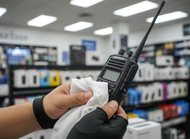
How to Clean Shared Two-Way Radios Safely
How to Clean Shared Two-Way Radios Without Damaging Them
Shared two-way radios pass through a lot of hands. In a single shift, a radio might be used by a warehouse supervisor, a maintenance technician, and a security guard—each bringing their own set of germs, sweat, and grime to the device. In high-traffic environments like hospitals, hotels, schools, and construction sites, that kind of shared use adds up fast.
The problem? Most people either skip cleaning altogether or reach for whatever wipe is nearby—not realizing that the wrong product can corrode contacts, fog displays, or push moisture into the speaker grilles. Keeping your radios hygienic doesn't have to be complicated, but it does need to be done correctly.
This guide walks you through everything: the right supplies, a step-by-step cleaning process, what to avoid at all costs, and how to build a maintenance routine that protects your investment long-term.
Why Radio Hygiene Matters More Than You Think
Radios are one of the most frequently touched tools on any job site. Unlike a keyboard or desk that belongs to one person, a shared radio changes hands constantly—and rarely gets cleaned between uses.
The consequences go beyond hygiene. Bacteria and moisture trapped around buttons and speaker grilles accelerate wear on the device. Corrosion builds up on charging contacts. Grime works its way into crevices, stiffening buttons and reducing responsiveness over time. A radio that isn't maintained will fail faster—and in industries where communication is critical, that's a real operational risk.
The good news is that a simple, consistent cleaning routine takes less than two minutes per device. Done right, it keeps your team healthy and your radios performing reliably for years.
Recommended Cleaning Supplies
Before you start, gather the right materials. Using the wrong products is one of the most common mistakes—and it can do more damage than skipping the clean entirely.
Safe to use:
- Isopropyl alcohol (70%) — The gold standard for electronics. It disinfects effectively and evaporates quickly without leaving residue. Avoid anything above 90%, as higher concentrations can be too harsh on plastics and rubber seals.
- Pre-moistened electronics wipes — Products like CareTouch or Endust for Electronics are formulated specifically for sensitive devices. Convenient for field use.
- Microfiber cloths — Soft, lint-free, and gentle on screens and housings. Ideal for wiping down surfaces after disinfecting.
- Cotton swabs — Perfect for cleaning around buttons, ports, and speaker grilles where a cloth can't reach.
- Compressed air — Great for blasting debris out of crevices without introducing any moisture.
Avoid:
- Bleach-based wipes or sprays
- Ammonia-based cleaners (including many glass cleaners)
- Hydrogen peroxide above 3%
- Any spray applied directly to the device
Step-by-Step: How to Disinfect a Two-Way Radio
Follow these steps every time a radio is cleaned or handed off between users.
Step 1: Power Down the Device
Turn the radio off before cleaning. This reduces the risk of accidental button presses and protects the circuitry if any moisture is inadvertently introduced. Remove the battery pack if it detaches easily.
Step 2: Remove Visible Debris
Use compressed air to blow out any dust, crumbs, or debris from the speaker grilles, microphone ports, and around the buttons. Hold the can upright and use short bursts to avoid introducing moisture from the propellant.
Step 3: Wipe Down External Surfaces
Dampen a microfiber cloth with 70% isopropyl alcohol—it should be barely moist, not wet. Wipe down the entire housing: front, back, and sides. Pay extra attention to high-contact areas like the push-to-talk (PTT) button, volume knob, and the back panel (which rests against the hand or belt).
Do not press hard around seams or ports. The goal is surface disinfection, not deep cleaning.
Step 4: Clean Around Buttons and Crevices
Dip a cotton swab lightly in isopropyl alcohol and run it around the edges of each button, along the channel selector, and around any exposed ports. This removes the grime that builds up in recessed areas—exactly where bacteria thrive.
Step 5: Clean the Antenna
Wipe the antenna with a lightly dampened microfiber cloth. If your radios use a removable antenna, unscrew it and clean the threading carefully with a dry cloth. Built-up grime on antenna threads can affect connectivity over time.
Step 6: Clean Charging Contacts
Use a dry cotton swab or microfiber cloth to gently clean the charging contacts on both the radio and the battery. Do not use alcohol on contacts unless they are visibly corroded—in that case, apply sparingly and allow to dry completely before reassembling.
Step 7: Allow to Air Dry
Let the radio sit for at least 60 seconds before powering it back on. Isopropyl alcohol evaporates quickly, but giving it a moment ensures no residual moisture is present before the device is used again.
Critical Warnings: What Not to Do
Getting the cleaning process right means knowing what to avoid just as much as knowing the right steps.
- Do not spray liquids directly onto the radio. Even if you're using a safe product, spraying it directly risks liquid entering the speaker grilles, microphone ports, or seams. Always apply to a cloth first.
- Do not submerge or rinse the radio. Even IP-rated radios have limits. Most are splash-resistant, not waterproof. Running water or soaking will void warranties and likely damage internal components.
- Avoid harsh chemicals. Bleach degrades rubber seals and plastic housings. Ammonia clouds display screens and weakens adhesives. These products might disinfect the surface, but they'll shorten the life of the device in the process.
- Do not use abrasive materials. scrubbing pads scratch display surfaces and wear down button labels. Stick to microfiber.
- Never clean while charging. Always unplug and power down before any cleaning. Cleaning a device that's plugged in introduces unnecessary risk.
Building a Maintenance Routine
A one-off clean won't cut it. To keep your radios in top condition—and your team protected—you need a routine that's consistent and easy to follow.
Daily Cleaning (Shift Handover)
Wipe down the housing and buttons with an electronics-safe wipe or alcohol-dampened cloth each time a radio changes hands. This takes under 60 seconds and prevents cross-contamination between users.
Weekly Deep Clean
Once a week, run through the full step-by-step process outlined above. Clean the charging contacts, check the speaker grille for buildup, and inspect the housing for cracks or wear.
Monthly Inspection
Check the battery terminals for corrosion, test the PTT button for responsiveness, and examine the antenna connection. If anything feels sticky, stiff, or corroded, address it before it becomes a bigger problem.
Assign Responsibility
Hygiene routines only work when someone owns them. Designate a team member—or rotate the responsibility—to ensure radios are cleaned consistently. In larger operations, consider keeping a cleaning log near the charging station so each clean is recorded.
Keep Your Radios Reliable for the Long Haul
A two-way radio is a durable, long-term communication tool—but even the toughest devices need basic care to perform at their best. The steps above are straightforward, take minimal time, and pay off significantly in device longevity, team hygiene, and operational reliability.
Start by stocking your station with the right supplies: 70% isopropyl alcohol, microfiber cloths, cotton swabs, and compressed air. Build the routine into your shift handover process. And make sure every team member understands what to avoid.
Clear communication depends on equipment that works. A clean radio is a reliable radio.